Face-swapping has become increasingly popular among digital producers, who are using tools such as Akool Face Swap with greater frequency. But is it the best one available? This comprehensive analysis delves into Akool’s features and functionality, as well as those of its leading competitors, including the recent entrant into the market, EasyFaceSwap.
How We Tested Akool Face Swap
We created an account and ran face swaps in a few different situations: a single portrait photo, a group photo and a short talking-head video clip. For the video test, we used footage of the subject moving their head and talking, as this is the most challenging scenario for any face swap tool. We ran each test more than once to check for consistency. Our notes below reflect what we actually saw on screen, not just Akool’s marketing claims.
What Is Akool Face Swap?
Akool face swap isn’t one single feature. It’s a set of modes, each built for a different job:
-
Photo & Video Face Swap — the core tool. Upload a source face and a target photo or video, and Akool blends the new face in while keeping expressions, lighting, and lip movement intact.
-
Multiple Face Swap — swap every face in a group photo or video at once, matching each person to a different target face.
-
Batch Face Swap — apply the same swap across a whole folder of images or clips at once, so you’re not doing them one by one.
-
Live Face Swap — a real-time mode that swaps your face through your webcam, and can feed into video calls or livestreams as a virtual camera.
None of this is free to use without limits. Akool’s free tier includes 100 credits and allows you to create face swaps up to five minutes long at 720p resolution (30 seconds per clip maximum), with a visible watermark on exports. Getting a clean, high-res result means paying, and the price can climb fast depending on resolution and how much you’re producing. Worth knowing before you build a whole workflow around the free tier.
Akool Face Swap Performance
We found Akool face swap feature to be genuinely good on clear, well-lit, front-facing photos and videos. Akool video face swap performed well through head turns and talking motions, and the lighting, shadows and lip-sync remained natural rather than appearing artificial.
It’s not perfect everywhere, though. In our tests, fast or jerky movement, a hand or object partly covering the face, sharp angles, and low light all led to some visible glitching around the edges of the face, especially if you’re free plan users. It’s also worth saying: other reviewers describe Akool video face swap quality as solid, not the best on the market. It handles standard cases well, but a tool built dedicated for face swap can sometimes produce a cleaner result.
Akool Face Swap Pricing
Akool runs on a subscription with credits layered on top, and pricing is per seat. Here’s how the tiers break down:
| Plan | Starting Price (billed annually) | Resolution | Face Swap Upload Video Size | Watermark |
|---|---|---|---|---|
| Free | $0 | 720p | 150MB and 30s | Yes |
| Starter | $12 | Up to 1080p | 300MB and 5mins | No |
| Pro | $30/seat/mo | 16K | 300MB and 5mins | No |
| Pro Max | $59/seat/mo | 16K | 500MB and 10mins | No |
| Business | $249/seat/mo | 16K | 1GB and 15mins | No |
| Enterprise | Custom | Custom | Custom | No |
A couple of things worth knowing: paying monthly instead of annually costs noticeably more per seat, credit amounts can be adjusted within each tier (which changes the price), and unused credits generally expire at the end of your billing cycle on paid plans. Since pricing pages update often and numbers vary by source, it’s worth double-checking the current rate on Akool’s site before you commit.
Pros and Cons of Akool Face Swap
Pros:
-
Strong video face swap that held up well through head movement and talking in our tests
-
Multiple face swap and batch mode built to handle real scale, not just one photo at a time
-
Live, real-time face swap for calls and streams
-
Kept lighting, shadows, and lip-sync looking believable in our tests on standard footage
Cons:
-
Free tier is watermarked, capped at 720p, and limits clip length
-
Paid plans get pricey fast, especially at higher resolution or volume
-
Credit costs change based on feature and resolution, which makes budgeting harder
-
Quality drops on tough footage — fast motion, partial coverage, or bad lighting
-
Too much tool for someone who just needs a simple, occasional face swap
Who Is Akool Face Swap Designed For?
-
Content Creators and YouTubers — swapping faces into thumbnails, sketches, or short videos.
-
Marketers and Agencies — making localized or multiple versions of an ad from one piece of footage.
-
E-commerce Brands — testing different faces on the same UGC-style video without reshooting.
-
Entertainment and Social Media Creators — fun, shareable face swap content across photos, GIFs, and short clips.
Akool Face Swap Alternatives
Akool vs Other Face Swap Tools
Akool is a premium, business-focused app that goes beyond just face swapping. It is designed for teams that require consistent video results on a large scale, and its pricing reflects this. This makes sense for agencies and brands, but it’s excessive for someone who just wants to swap a face in a photo or short clip.
For simpler needs, EasyFaceSwap is worth considering. It’s a free, browser-based tool that can swap faces in photos and videos/GIFs with no sign-up and no watermark. You simply upload two files and receive the result in seconds, skipping the cost and account setup completely for straightforward photo and video swaps.
Here’s how Akool compares with a few other face swap tools with a free plan that we looked at:
| Face Swap Tool | Best For | Free Plan | Upload Limit | Watermark | Commercial Use | Starter Pricing |
|---|---|---|---|---|---|---|
| Akool | Marketing teams | 100 credits (no expire) | 150MB / 30s | Free plan only | Paid plan only | $12/seat/mo (annual) |
| EasyFaceSwap | High-quality, affordable video swaps | Unlimited | 30s/clip | None | Yes (Free tier) | No paid tier, fully free |
| Vidnoz | All-in-one AI video creation | 30 credits/day (~60s) | 100MB | Free plan only | Paid plan only | $26.99/mo |
| Magic Hour | Multi-format face swap & creative campaigns | 3 videos/day, 5 photos/day | 10s/clip | Free plan only | Creator plan+ | $19/mo (Creator, annual) |
A few things stand out here. EasyFaceSwap is the only tool on this list with no watermark and no paid tier at all — you get commercial-ready results without paying anything. Vidnoz allows more than just face swaps but charges the most per month, and its commercial use is locked behind a paid plan. Magic Hour and Akool both run on credits, with Akool’s per-seat pricing built more for teams than individual creators.
How to Choose the Right Face Swap Tool
It really comes down to three questions:
-
How often will you use it? If you’re doing lots of professional video work, like ad variations or batch jobs, a paid tool like Akool is worth it. If you just use it casually, EasyFaceSwap probably is the better option for you.
-
What’s the result for? Professional marketers willing to pay for such products may benefit from Akool’s stronger video handling for client work or ads with a lot of motion. However, casual photos, memes or personal projects don’t require that level of power; alternatives such as EasyFaceSwap may be a more affordable choice.
-
Do you need the extra features? Live camera mode, translation, and batch processing are great if you’ll actually use them, and dead weight if you won’t. If face swap is the only box you need to check, a free, focused tool like EasyFaceSwap does the same core job without the rest of the platform attached.
How to Use Akool Face Swap
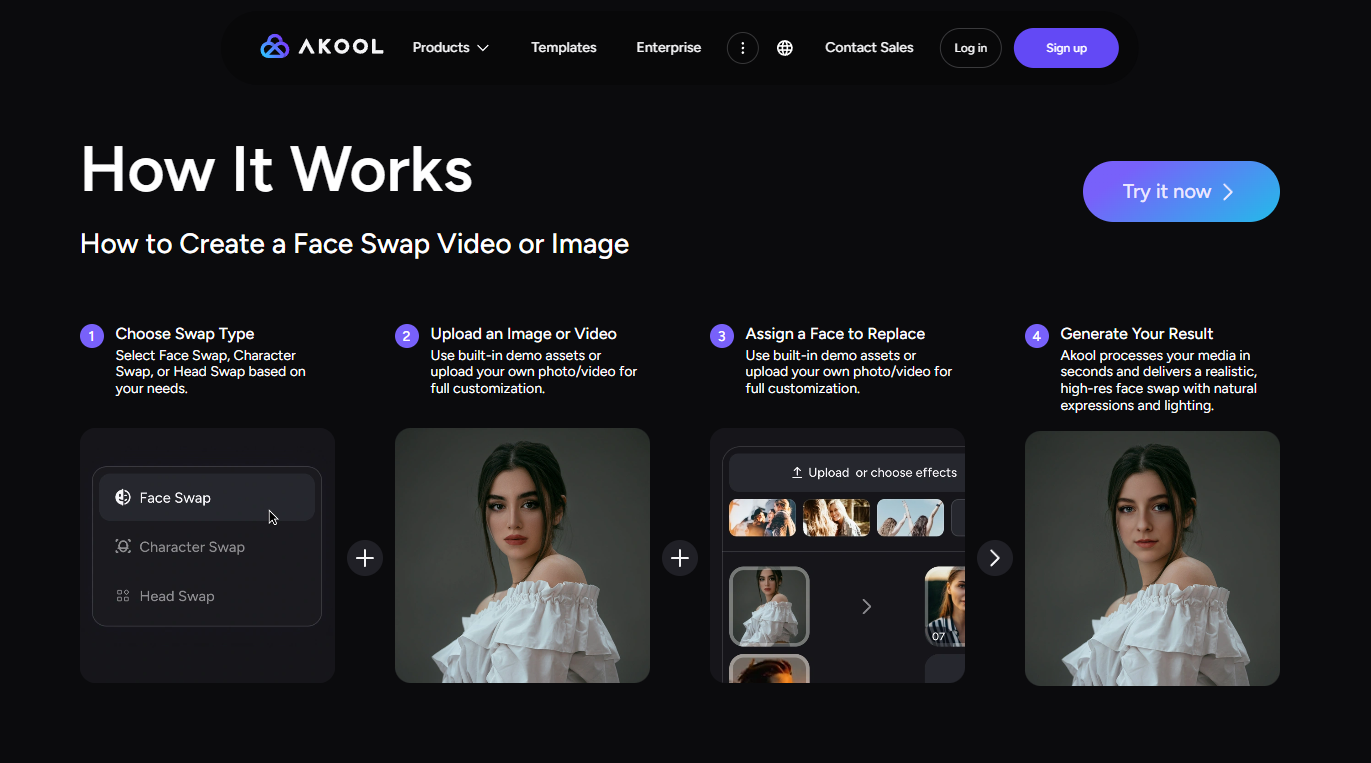
Step 1: Choose Swap Type
Pick the mode that fits your job: standard photo or video swap, multiple face swap for group content, batch mode for several files at once, or live face swap for real-time camera use.
Step 2: Upload an Image or Video
Upload the base photo or video you want to edit. Akool finds every face in the frame on its own, group shots included, so there’s no manual masking.
Step 3: Assign a Face to Replace
Upload the source face, or pick one from Akool’s stock face library, and match it to the face you want swapped. For group photos, repeat this for each person.
Step 4: Generate Your Result
Run the swap and let Akool handle the blending, lighting match, and — for video — lip-sync and expression. Turning on face enhancement, when it’s offered, usually gives a cleaner final result.
Final Verdict: Is Akool Face Swap Worth It in 2026?
In our testing, Akool face swap feature performed well with both photos and videos. However, this quality comes at a business-level price. Because credits are shared across Akool’s entire range of products, it’s more difficult to predict your monthly costs than with a flat-rate tool.
However, if you are an agency, marketing team or content creator who often performs video face swaps and also requires other AI generative tools, Akool is a worthwhile investment. However, if your needs are simpler — for example, if you only need to swap faces in photos or videos — a free unlimited tool like EasyFaceSwap will be a great alternative to Akool.
Frequently Asked Questions
What Is Akool Face Swap?
Akool Face Swap is an AI feature inside the Akool platform that replaces a face in a photo or video with a different target face, while keeping lighting, expressions, and — for video — lip-sync intact.
Is Akool Face Swap Free?
There’s a free tier for testing, but it’s capped at 720p, limited to short clips, and every export has a visible Akool watermark. You’ll need a paid plan to remove the watermark and unlock higher resolution.
How Much Does Akool Face Swap Cost?
Pricing is tiered, starting free and scaling through paid plans from around the low tens of dollars a month up to several hundred for higher-volume business use. Video face swap is often billed per second on top of your plan’s credits, so your actual cost depends a lot on how much video you’re processing.
Is There Any Akool Video Face Swap Alternative?
Yes. EasyFaceSwap is a free, browser-based alternative that handles both photo and video face swap without a sign-up, watermark, or credit system. It’s a simpler pick if you don’t need Akool’s business-level features like live camera mode or large batch processing.
Does Akool Support Video Face Swap?
Yes, video face swap is one of Akool’s core features. It supports single and multiple faces in moving footage, and it works to keep lighting, expression, and lip-sync looking natural.
Does Akool Support Multiple Face Swaps?
Yes. Akool can find and swap several faces in the same photo or video at once, matching each person in the frame to a different target face you choose.
What Video Formats Does Akool Face Swap Support?
Akool video face swap generally works with common formats like MP4. Upload size and length limits change by plan — the free tier caps you at a short clip, while paid tiers allow longer, higher-res uploads.
Can I Use Akool Face Swap for Commercial Content?
You’ll generally need a paid plan, since free results are watermarked. As with any face swap tool, only use it on subjects who’ve given consent, and check Akool’s current terms before using swapped content in client work or ads.
How to Get Free Akool Face Swap Credits?
New Akool users are granted 100 credits, which should allow them to create two videos. However, premium capabilities are only available with paid subscriptions.
Is Akool Face Swap Safe?
Akool works with established brands on commercial campaigns, which says something about its reliability as a platform. That said, safe use comes down to how you use Akool face swap more than the tool itself. Only swap faces with consent, and don’t use the technology to impersonate real people without permission.