Multiple Face Swap GIF Online Free

Make a multiple face swap GIF online free. Swap up to 4 different faces in one GIF with EasyFaceSwap, no sign up and no watermark.
Source GIF
Sample GIF face swap before-and-after preview

Free Multi Face GIF Swap Online


A group chat reaction GIF usually has more than one face in it, and most tools either cap the free swaps or stamp a watermark on the result. EasyFaceSwap runs multi face gif swap free for these group shots, downloads come back clean with no watermark, and it is fully online, with no software to download and no app to install.One thing from real use: GIFs with a steady frame rate and each face turned toward the camera give the cleanest swap across all four faces, while shaky clips or faces bunched close together tend to soften at the edges. Free and install-free means you can redo a swap look after look until the timing lands, without a watermark ruining the joke.

Swap face gif keeping the same motion

Match Different Faces in One GIF



A regular gif face swap replaces just one face and stops there. The moment your GIF has a whole group in frame, swapping one face leaves everyone else a stranger and the joke falls apart. A real multiple face swap has to treat each person as their own job, and that is the core difference between EasyFaceSwap and a one-face tool.A multiple face swap GIF splits every face it detects in the GIF into its own slot, and whoever you assign to a slot is who that person becomes. Your face on one, a friend's on another, with the two mappings never bleeding into each other, so no one gets the same face by accident and no one is left out. Who becomes who is fully yours to control before the result is generated, and that face-by-face precision is why a group GIF reads as intended instead of scrambled.

Clean face swap gifs with no watermark

HD Multiple Face Swap GIF Results

A multiple face swap GIF lives or dies on the details. Blocky edges around the jaw, a face that flickers as the GIF loops, skin tones that clearly do not match the body. On a moving GIF those flaws are harder to hide than on a still photo, because every frame gives the eye another chance to catch them. EasyFaceSwap holds each swapped face aligned and blended across the full loop and outputs an HD GIF, so the result reads as one clip instead of a face pasted on top.Front-facing faces with clear lighting give the cleanest multiple face swap gif results, the same way they do in any face tool. Sharp source photos help too. When your inputs are good, EasyFaceSwap reaches 95%+ face similarity and the swapped faces hold their shape through the whole animation instead of smearing on the fast frames. You get an HD GIF you can drop straight into a chat or a post without a second pass in an editor.

AI gif face swap in a browser, no sign up

Multiple GIF Face Swap for Memes



Memes are where multiple face swap GIFs earn their keep. The template is already funny. Putting your own crew's faces on it is what makes people actually reply. A reaction GIF where all three characters are your group chat lands harder than any caption.Famous movie scenes, party dancing clips, well-known argument GIFs all make great multiple face swap GIFs. The key is that EasyFaceSwap detects and blends each face on its own, so all four characters stay distinct and recognizable instead of collapsing into a row of repeated faces. That is what gets a meme reshared around the group rather than read as an obvious template.

Frame strip of a swap faces gif staying smooth

Why Choose EasyFaceSwap for Multiple Face Swap GIFs

Experience the reliable, secure, and user-friendly generator available today.

Match Up to 4 Faces in One GIF

EasyFaceSwap handles up to 4 faces in a single GIF, enough for most reaction clips, duos, and small group scenes. The tool detects each face automatically, then hands you one slot per person, Face 1 through Face 4, so you decide every replacement yourself. No guessing which face the AI will grab, and no settling for swapping just the one in front.

Cleaner Results for Group GIF Face Swaps

Group GIFs are where most tools smear faces together or blur the ones near the edge. EasyFaceSwap treats each detected face as its own job, aligning and blending it to that specific person across the frames. The faces in the back of a party GIF get the same attention as the one up front, so the whole group looks intended rather than patched in.

Get 95%+ Face Similarity in GIF Results

A swap only works when the face actually looks like the person. EasyFaceSwap reaches 95%+ face similarity on clear source photos, so each replacement reads as the real person rather than a rough lookalike. That accuracy holds across the frames, which matters more on a looping GIF than on a single still.

Finish Group GIF Edits in One Workflow

Swapping four faces should not mean four separate tools. EasyFaceSwap keeps detection, matching, and generation in one place, so you upload once, assign every face, and export the finished GIF without leaving the page. As a multiple face swapper built for GIFs, it handles the whole group edit in a single pass instead of one face at a time.

How to Create a Multiple Face Swap GIF

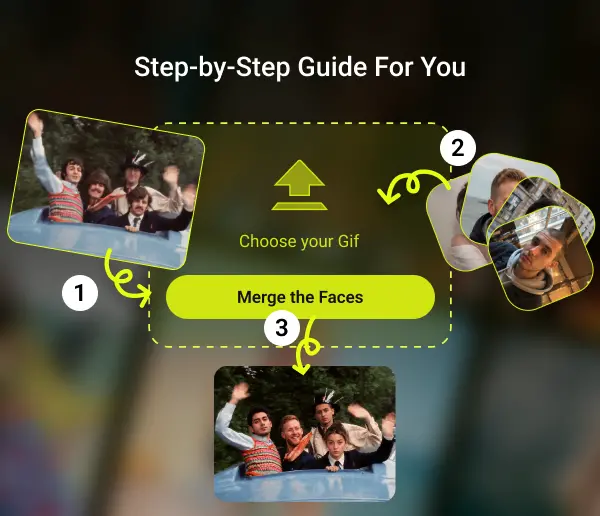
Making a multiple face swap GIF takes three steps, from upload to download.

  1. 1

    Step 1: Upload Your GIF

    Open the tool and upload the GIF you want to change. EasyFaceSwap scans it and detects every face in the animation, then shows them to you as separate slots to fill.

  2. 2

    Step 2: Match Replacement Faces to Each Person

    For each detected face, upload the photo you want in its place. Match them one at a time, Photo A to Face 1, Photo B to Face 2, so every person in the GIF gets the exact face you choose. This is the multi face gif swap step, where you decide who becomes who.

  3. 3

    Step 3: Generate Your Multi Face Swap GIF

    Hit generate and let the AI apply every swap across the frames. When it finishes, download your multiple face swap gif online free, no sign up and no watermark, ready to share anywhere.

Three steps to swap a face in a GIF

What Users Say About Our Multiple Face Swap GIF

Here is what people say after making their first multiple face swap GIF with EasyFaceSwap.

Maya R.
Maya R.Discord server mod

"For those group meme GIFs where everyone is in frame, I used to swap each person one at a time and stitch it together, which was a pain. Now I drop in a four-person movie GIF and all four faces get matched at once, done in a few minutes. A face near the edge is sometimes a bit off, but re-uploading a front-facing photo fixes it."

Jordan T.
Jordan T.Freelance meme maker

"What matters to me is that I pick which face goes on which person. Other tools kept auto-assigning the wrong one, and a two-person GIF is ruined the moment that happens. Here I place each one myself, so my duo memes do not need redoing. Profile-angle frames get a little soft, but the straight-on parts hold up."

Priya S.
Priya S.College student

"I wanted to surprise my friends for a birthday and put the four of us into a dancing GIF, and I do not know how to use Photoshop at all. This detected each face for me after I uploaded, so I just filled them in. The group chat lost it."

Daniel K.
Daniel K.Small streamer

"I make reaction GIFs with our own faces as emotes for my stream. Being able to swap four people at once is the key part, since the whole mod team fits in one meme. Fast-moving GIFs come out so-so, but a slower loop looks convincing."
Aisha M.
Aisha M.Casual user

"I just use it for fun. I put my family's faces into those old movie dancing clips and send them to the family chat, and my mom laughs about it all day. Nothing to install, works straight in the browser, which matters for someone like me who cannot be bothered."
Ryan P.
Ryan P.Longtime Reddit user

"I have tried several GIF face swappers and most start smearing once there is more than one face. This one stays clear even swapping four faces at once, which is why I kept it. If anything, I wish it handled more faces, four is not always enough."
Multiple Face Swap GIF FAQs

Get clear answers to ensure a safe, efficient, and high-quality experience.

A multiple face swap GIF is an animated GIF where more than one face has been replaced. Instead of swapping a single face, you replace several faces in the same clip, matching a different person to each one, so an entire group in the GIF becomes the people you choose.

EasyFaceSwap lets you swap up to 4 faces in one GIF. The tool detects each face in the animation and gives you a separate slot for every one, Face 1 through Face 4, so you can replace them all or just the ones you pick.

A GIF is a sequence of frames. The AI first recognizes each face in the scene and gives it its own identity, then tracks that same person frame by frame, so a face does not get confused with the person next to it even as people move or turn. Because every face is identified separately, the replacement you assign to one person only lands on that person, which is what lets it swap several faces at once without scrambling them.

Yes. You can create a multi face gif swap for free, and your downloads come with no watermark. Upload a GIF, match a face to each person, and generate your result at no cost.

Yes. EasyFaceSwap is an online tool that runs in your browser, with no software to download and no app to install. Open the page, upload your GIF, and make your multiple face swap gif online free right there.

No. Your finished multiple face swap GIF downloads clean, with no watermark and no branding across the image, for every user.

A single face swap replaces one face and ignores the rest. A multiple face swapper detects every face in the GIF and lets you assign a different replacement to each person, which is what you need for group scenes, duos, and memes with more than one character.

Yes. The tool runs in your mobile browser the same way it does on desktop, so you can make a multiple face swap GIF on iPhone or Android without installing an app.

Yes. After detection, you decide face by face. Replace everyone in the GIF, or leave some untouched and only swap the people you want.

Yes. Use it as a multiple face swap GIF maker: upload a ready-made GIF, swap a new face onto each person in it, and get a finished GIF back, ideal for reaction GIFs, memes, and group animations.

Your uploaded GIF and face photos are used only to generate your result.

Create Your Free Multiple Face Swap GIF Now

Turn any GIF into a group moment with the people you actually want in it. Upload a GIF, match up to 4 faces, and download your multiple face swap gif online free, with no sign up and no watermark.

Swap Faces Now