Introduction
If you have scrolled through TikTok, Instagram, or Reddit recently, you have likely seen seamless photo edits that left you wondering how to face swap without spending hours mastering complex masking tools. For a long time, achieving a photorealistic blend required advanced graphic design skills in desktop software, or downloading sketchy mobile apps that demand your phone number and harvest your biometric privacy.
As someone who loves experimenting with digital media but hates giving out personal data, I spent this past week looking for a friction-free alternative. The standout performer in my test was EasyFaceSwap—a web-based tool that promises high-definition, watermark-free results with zero sign-up strings attached. In this long-form review and hands-on guide, I will share my actual testing workflow, analyze what happens behind the scenes, and show you how to face swap online with professional-grade results on your very first try.
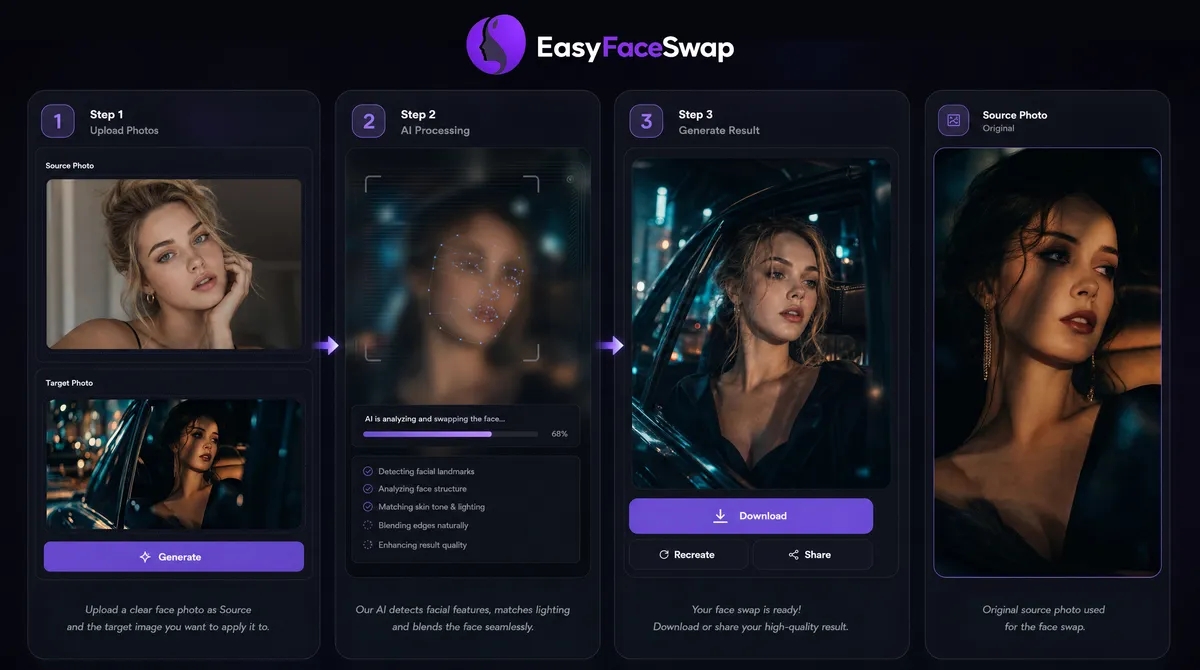
1. How to Face Swap Online in 3 Simple Steps
If you are trying to figure out how to face swap for free, the basic workflow requires just three simple actions:
Step 1: Uploading Your Photos to the Web Interface
First, navigate to the main page. The system gives you two distinct, straightforward drop zones:
- The Source Image: This is the photo with the specific face you want to extract and keep. In my case, I used a high-res front-facing portrait of myself.
- The Target Image: This is the background photo where the new face will be stitched. I tested this using various templates from daily selfies to movie stills.
Step 2: Running the AI Face Swap Photo Generation Engine
Once your assets are uploaded into the browser slots, you simply hit the Swap Faces button. Behind the scenes, the system hands the files over to cloud-hosted deep learning models to process the image.
Unlike older editing apps that merely clip a flat 2D sticker over a head shape, this modern AI pipeline performs facial landmark detection across 68 structural coordinates. It measures head tilt, adjusts bone structure geometry, matches the RGB color balance of the environment, and diffuses the edge borders so the final face swap photo looks completely natural. The processing took about four to five seconds in my tests, and I did not have to toggle a single annoying button.
Step 3: Downloading Your Final High-Definition Edit
Once the progress bar finishes, the final composition renders right inside your browser window. I was relieved to find that the system preserves the resolution of the target file and leaves no hidden watermarks behind. You just hit “Download” to save the clean file directly to your local device.
From a security standpoint, the platform states that all uploaded files are deleted from the server immediately after processing. This offers a significant advantage in terms of privacy protection; for those users who are interested in how to face swap, it is far superior to mobile apps that create permanent profiles based on behavioral or biometric data.
2. How to Face Swap with Photorealistic Results
While the artificial intelligence engine does an excellent job of automating the heavy lifting, I quickly discovered during my trial runs that AI is still bound by the rule of “garbage in, garbage out.” If your input photos clash dramatically, the output will look awkward and synthetic.
If you want to master how to face swap online free while completely avoiding that weird, “pasted-on” look, here are the exact rules of thumb I gathered from my own testing failures and successes:
Match the Lighting Direction
When you first learn how to face swap, lighting is the detail most beginners overlook. During my initial test, I tried to swap a face that was lit heavily from the left side onto a target body standing directly beneath a right-side street lamp. The result looked immediately off. Even though the AI tried its best to adjust the skin tones, it could not rewrite the physical laws of light and shadow.
I achieved the absolute best results when both photos shared similar lighting directions. If you want a seamless composition, take a moment to look at your images: if one photo has harsh sunlight and the other was shot under soft, diffused indoor light, don’t mix them. Give the AI a balanced starting point, and the blend will look flawless.
Keep Faces Front-Facing
If you want to master how to face swap without distortion, stick to front-facing portraits — that’s where the cleanest stitches happen. When I tried forcing a sharp 45-degree side profile shot onto a flat, forward-facing corporate headshot, the model struggled. It introduced minor stretching distortions around the cheekbones, jawline, and ears as it tried to guess the missing structural data. For your first few experiments, save yourself the headache and use two photos where the subjects are looking straight at the lens.
Use Clear, Unobstructed Faces
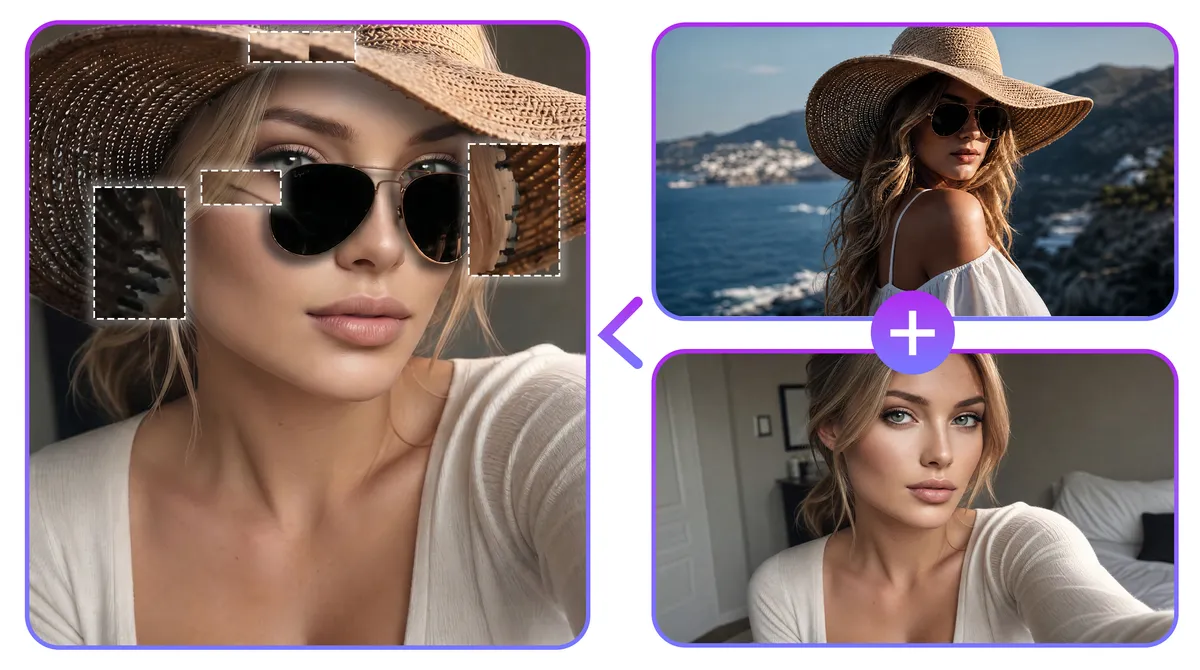
In one of my early trial runs, I tried using a cool summer photo where the subject was wearing a wide-brimmed straw hat and a pair of dark aviator sunglasses. The result was a total mess. Because the AI relies on clear visibility to analyze your features, masking your face with accessories like hats, heavy beanies, or sunglasses completely blinds the algorithm. It simply doesn’t know what your actual eyes or forehead look like, making it impossible to calculate a precise 3D facial mesh or generate a believable blend.
For a seamless edit, look for raw, unshielded portraits. You want photos where the entire face—extending clearly from the top of the forehead down to the baseline of the chin—is fully visible to the camera. Avoid any images with hands covering the jawline, heavy face-framing hair strands, or accessories that cast deep, unnatural shadows across the eye sockets.
Skip Heavily Filtered Photos
I tried using a selfie that had a heavy Instagram beauty filter applied, and the AI output looked incredibly plastic. Because beauty filters artificially smooth out skin textures and distort natural eye-to-nose proportions, the AI cannot build an accurate 3D facial mesh. If you are learning how to face swap a photo for the first time, skip the filtered shots. Stick to clean, unedited smartphone camera shots for your source faces to get the most natural skin texture blending.
3. Why Learning How to Face Swap a Photo is Highly Useful
Once you get a feel for how an online face swap functions, you will find that this tool is actually a highly practical utility rather than just a way to make goofy memes for a group chat. Here are six real-world scenarios where knowing how to face swap has completely saved my own media assets:
Save Your Best Travel Memories
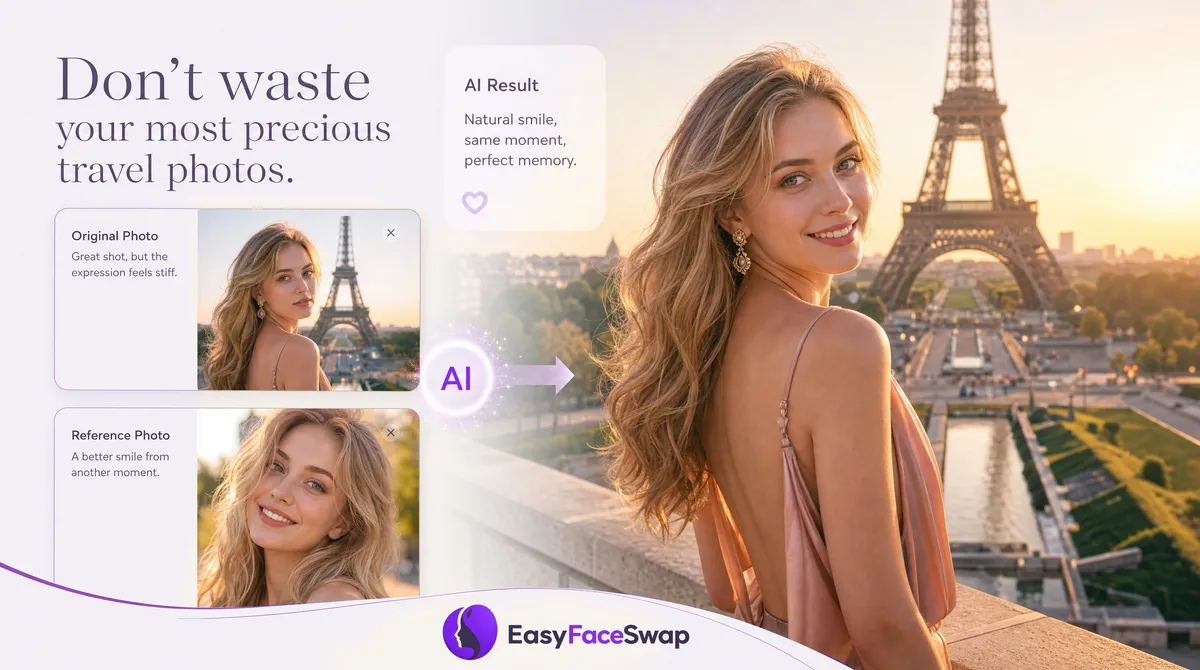
Imagine traveling all the way to the Eiffel Tower, waiting in line for hours, and finally getting a photo with almost no tourists in the background — only to realize later that your smile looks stiff or awkward. Instead of letting that perfect shot go to waste, learning how to face swap gives you a simple way to fix it. Use a more natural portrait taken elsewhere, and AI can blend it into the original travel photo while preserving the background, lighting, and perspective.
Discover Movie Character Face Swaps
Whether you’re planning an elaborate Halloween costume or simply satisfying your curiosity, learning how to face swap into your favorite movie character is surprisingly simple. Start with a high-resolution movie still, and the AI automatically blends your face with the original lighting, composition, depth of field, and cinematic color grading. Within seconds, you’ll look like you belong in the Hollywood scene.
Fix Blinks in Group Photos
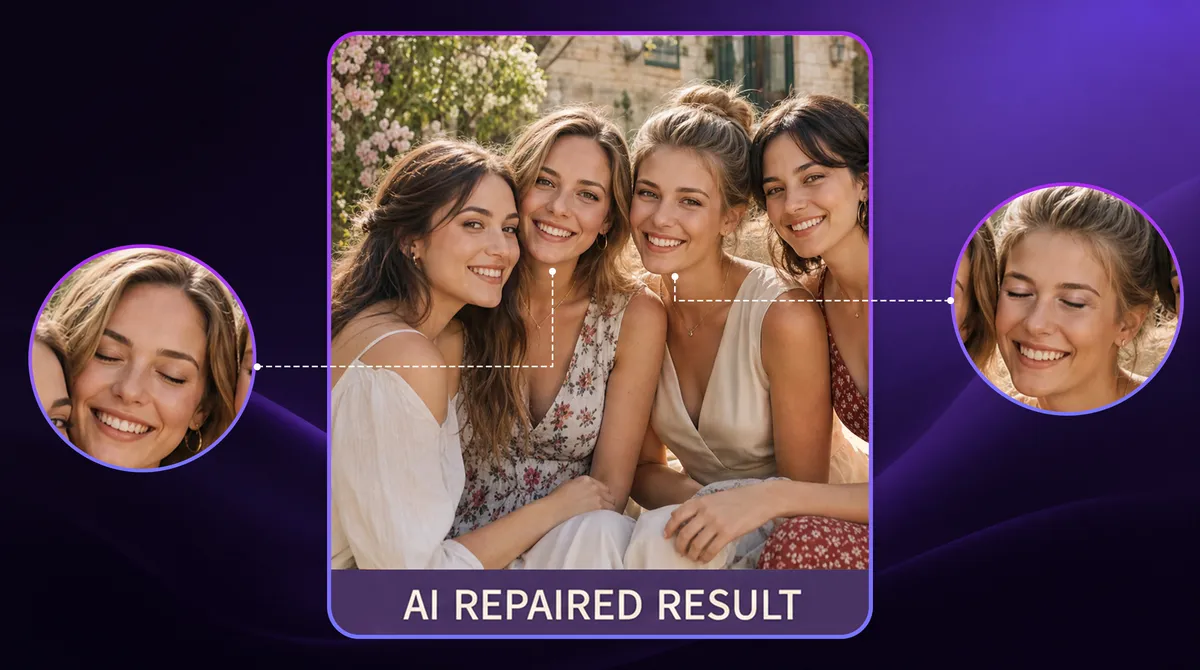
We have all dealt with this frustration: you finally gather a large group of people together for a photo, but someone inevitably blinks, sneezes, or looks away right as the shutter clicks. Instead of tossing a great memory in the trash, you can use a secondary shot taken a few seconds later as your source image. Because the ambient light and clothing match perfectly, executing a quick face swap photo fix lets you seamlessly graft the open-eyed face onto the ruined target photo, resulting in a perfect group portrait.
Join the Excitement of Live Events
Missing out on a championship game or sold-out concert doesn’t mean you have to miss the fun online. Many sports fans and music lovers use these moments to explore how to face swap by placing themselves into crowd shots, press photos, or iconic event images. The finished edits are fun to share and make social posts feel much more personal.
Level Up Your Profile Picture With Viral Memes
Whether you’re creating a unique avatar or joining the latest meme trend, learning how to face swap has never been easier. Instead of spending time with complicated desktop editors, simply upload your photos and let AI create a clean, watermark-free image that’s ready to post on Discord, X, or Reddit.
Design Personalized Holiday Greeting Cards
Generic holiday templates can feel repetitive year after year. A creative way to practice how to face swap is by placing your family and friends into festive scenes for Christmas cards, birthday invitations, or seasonal greetings. In just a few clicks, you can create personalized designs that look far more memorable than stock templates without paying for professional editing software.
FAQs
How do I face swap online for free?
Go to EasyFaceSwap, upload your source face photo and your target photo, click “Swap Faces,” and download your result. The entire process is free with no account required. Your photos are deleted from the server after processing.
Can I face swap on my phone or mobile browser?
Yes. EasyFaceSwap is fully browser-based and works on any mobile device — iPhone, Android, or tablet — without downloading an app. Open the site in your mobile browser, upload photos directly from your camera roll, and download the result to your phone. No app store, no installation required.
How long does a face swap take?
On EasyFaceSwap, face swap photo processing is near-instant. Most results appear within a few seconds of clicking generate, depending on your internet connection and the resolution of your photos. No queuing, no waiting room — the result loads as soon as it is ready.
Can I face swap without Photoshop?
Yes — you don’t need Photoshop, design skills, or any software at all. EasyFaceSwap handles everything automatically in the browser. Upload two photos, click generate, and download a clean HD result. The entire face swap process requires zero editing knowledge or technical experience.
Is it safe to upload my photos to a face swap tool?
On EasyFaceSwap, uploaded photos are automatically deleted from the server immediately after your face swap is generated. No images are stored, shared, or used for model training. Always check the privacy policy of any face swap online tool before uploading personal photos.
Conclusion
To be honest, web-based AI has lowered the entry barrier for photo editing down to zero. Anyone looking into how to face swap can now get started without learning complicated editing software. Just upload two photos and let the AI handle the heavy lifting.
However, the tool is only as good as your starting materials. Before you click generate, take an extra minute to pick two photos that share matching lighting directions, clean angles, and zero face obstructions. That way, the final skin textures and environmental shadows will blend seamlessly into one natural image. If you have a couple of pictures you’ve been wanting to fix or play around with, head over to EasyFaceSwap and give it a shot—it’s completely free, requires no signup, and delivers clean results in seconds.