If you’ve been searching for vidnoz face swap, chances are you’re trying to answer one simple question: is Vidnoz actually worth using, or is there a better AI face swap tool out there? This guide breaks down exactly how Vidnoz Face Swap stacks up against EasyFaceSwap, one of the most talked-about Vidnoz alternatives right now, so you can pick the right tool the first time.
We tested both platforms across video quality, speed, pricing, ease of use, and privacy — the things that actually matter when you’re swapping faces in a video, not just a static photo.
TL;DR: Is EasyFaceSwap a Good Vidnoz Face Swap Alternative?
Yes — for most users who care about video face swapping specifically (not just photos), EasyFaceSwap is a strong Vidnoz AI alternative. It’s built with a sharper focus on AI video face swap quality and a simpler workflow, while Vidnoz spreads its features across a much larger, more general AI video toolkit.
| EasyFaceSwap | Vidnoz Face Swap | |
|---|---|---|
| Best for | Fast, high-quality video face swaps | Users who want an all-in-one AI video suite |
| Video face swap quality | High, natural blending | Good, but more variable on complex motion |
| Ease of use | Very simple, few steps, no sign-up required | Simple, but more menus/features to navigate |
| Free tier | Completely free, unlimited uses | Free, but limited to 30 credits/day (≈60 seconds) |
| Watermark | No watermark | Watermark on free-tier exports |
| Output resolution | HD output | Varies by plan |
| Supported video formats | MP4, MOV, WEBM, M4V | MP4 and other common formats (platform-dependent) |
| Privacy | Clear data handling policy | Standard cloud-based processing |
Quick verdict: if your main use case is video face swaps and you want speed, unlimited free usage, and no watermark, EasyFaceSwap is the better fit. If you already use Vidnoz for other AI video tasks (avatars, dubbing, editing) and just want face swap as a bonus feature — and don’t mind the daily credit cap — sticking with Vidnoz may be more convenient.
What Is Vidnoz Face Swap and Why Do Users Look for Alternatives?
What Is Vidnoz AI Video Swap?
Vidnoz Face Swap is a feature inside the broader Vidnoz AI platform that lets users replace a face in a photo or video with another face using AI. It’s part of Vidnoz’s larger suite of AI video tools, which also includes AI avatars, text-to-video, and video editing features. The vidnoz ai video swap tool is aimed at casual users, meme creators, and marketers who want a quick, browser-based way to swap faces without any editing software.
Why Look for a Vidnoz AI Alternative?
Most people searching for a vidnoz ai alternative run into one of a few common issues: inconsistent output quality on video (as opposed to still photos), a workflow that feels cluttered because face swap is buried inside a much bigger product, or uncertainty around free-tier limits and pricing. Others simply want to compare options before committing, especially if face swapping video — not photos — is their main use case. That’s exactly the gap a more focused tool like EasyFaceSwap is designed to fill.
Quick Verdict: EasyFaceSwap vs Vidnoz Face Swap
If you only read one section, read this one. EasyFaceSwap wins on video face swap** quality** and simplicity, because it’s purpose-built for this one task rather than one feature among dozens. Vidnoz wins on breadth, since it bundles face swap with a wider AI video toolkit, which can be convenient if you need those other tools anyway. Neither tool is “bad” — the right pick depends on whether you want a specialist or a generalist.
EasyFaceSwap vs Vidnoz Face Swap: Head-to-Head Comparison
AI Video Face Swap Quality
Video face swapping is harder than photo face swapping because the AI has to track facial movement, lighting changes, and angles frame by frame. EasyFaceSwap is built specifically around this challenge, which shows in smoother edge blending and more consistent results as a face turns or the lighting shifts. Vidnoz Face Swap performs well on straightforward, front-facing clips, but quality can dip on faster motion or side profiles, which is common for tools that treat face swap as one feature among many rather than the core product.
Speed & Processing Time
Because EasyFaceSwap is a dedicated face swap tool, its processing pipeline is streamlined specifically for this task, which generally means faster turnaround on video renders. Vidnoz’s processing speed is solid for shorter clips but can slow down as video length or resolution increases, partly because the platform is handling a wider range of AI workloads behind the scenes.
Ease of Use & Workflow
Both tools are designed to be accessible to non-editors, but the experience differs. EasyFaceSwap keeps the workflow to a few clear steps: upload your video, upload or select a face, and export. Vidnoz’s interface is also beginner-friendly, but because face swap sits inside a larger suite of AI video tools, first-time users sometimes need a moment to find the right menu before they even start swapping faces.
Free Features & Pricing
This is where the two tools diverge the most. EasyFaceSwap is currently completely free to use, with no usage limits, no watermark on exports, and no account or registration required — you can go straight to the site and start swapping faces in HD. Vidnoz, by contrast, gates its free plan behind a daily credit system: free users get 30 credits per day, which works out to roughly 60 seconds of face-swapped video, and exports on the free plan carry a watermark. If you need more than a minute of face-swapped video a day, or want watermark-free face-swapped video output, Vidnoz requires upgrading to a paid plan.
Video Format Support
Format compatibility matters if you’re pulling footage from different cameras, editing apps, or social platforms. EasyFaceSwap supports a wide range of common video formats, including MP4, MOV, WEBM, and M4V, covering most footage straight out of a phone, camera, or editing tool without needing to convert files first. Vidnoz also supports MP4 and other widely used moving-image formats, though exact format support can vary depending on which part of the Vidnoz platform you’re using, so it’s worth double-checking your specific file type against Vidnoz’s current format list before uploading.
Multi-Face Swap & Batch Processing
Both EasyFaceSwap and Vidnoz support swapping multiple faces within a single video, which matters for group scenes or content with more than one person on screen. EasyFaceSwap’s batch processing is geared toward creators who need to run multiple videos through the same swap quickly, while Vidnoz handles multi-face swaps well but as part of its general video editing flow rather than a dedicated batch feature.
Video Resolution & Export Options
Export quality is one of the most practical differences between the two. EasyFaceSwap outputs in HD by default, even on its free, unlimited-use tier, with no watermark added to exports — which matters if you’re publishing to platforms that compress footage heavily, like social media. Vidnoz offers solid export options as well, but resolution and watermark-free exports are typically tied to paid plans, since the free tier is capped by the daily credit limit and includes a watermark.
Privacy & Data Security
For any tool that asks you to upload your face, privacy is a legitimate concern — and it’s one of the most common things people search before choosing between is vidnoz ai safe and its alternatives. EasyFaceSwap is transparent about how uploaded media is processed and stored, which matters if you’re swapping faces for client work or sensitive content. Vidnoz, like most cloud-based AI platforms, processes uploads on its servers under a standard privacy policy — worth reviewing directly if data handling is a top priority for you.
EasyFaceSwap Review: Features, Pricing, and Who It’s Best For
EasyFaceSwap Overview
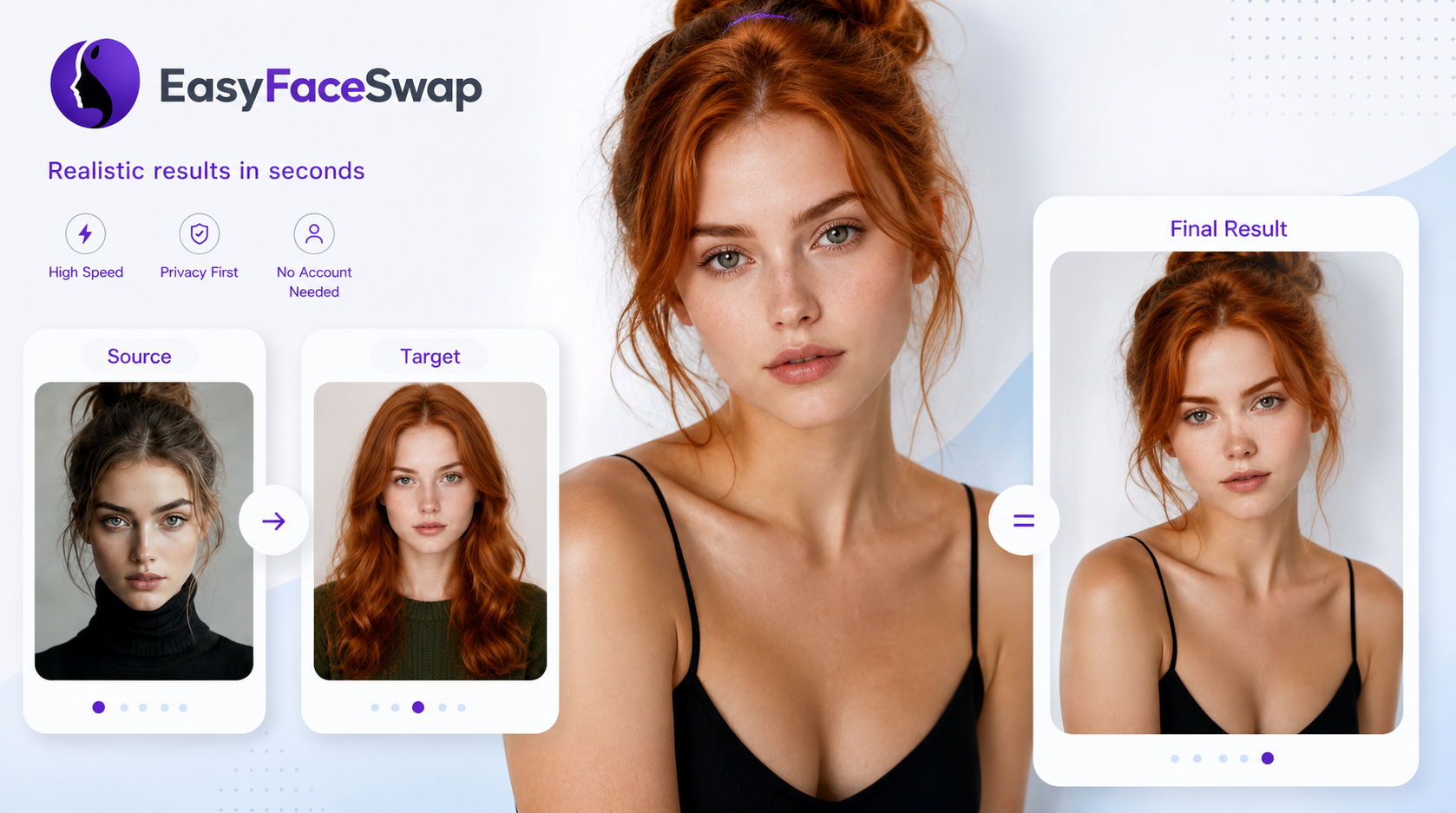
EasyFaceSwap is an AI-powered face swap tool built specifically for video content, positioning itself as a faster, simpler alternative to bundled platforms like Vidnoz. Instead of trying to be an all-in-one AI video suite, it focuses entirely on doing one thing well: swapping faces in video with natural, believable results.
Key Features for AI Video Face Swap
The core feature set centers on video face swapping with attention to blending, lighting consistency, and motion tracking — the details that separate a convincing swap from an obviously fake one. It also supports multi-face swaps for videos with more than one person, along with export settings aimed at preserving quality for social and marketing use.
EasyFaceSwap Pros & Cons
Pros: focused specifically on video face swap quality, streamlined and fast workflow, straightforward pricing tied to the feature you actually use, clear multi-face support.
Cons: doesn’t include the broader AI video toolkit (avatars, dubbing, full editing suite) that platforms like Vidnoz offer, which matters if you need those extras in one place.
EasyFaceSwap Pricing & Free Tier
EasyFaceSwap is currently free to use in full — there’s no usage cap, no watermark on exports, and no registration required. You can go straight to the tool, upload your video, and export in HD without hitting a paywall or a daily limit. That makes it an easy first choice if you want to test video face swap quality (or just get the job done) without committing to a subscription.
Who Should Use EasyFaceSwap?
EasyFaceSwap is the better fit for content creators, marketers, and agencies whose primary need is high-quality video face swapping — think meme content, entertainment clips, personalized video ads, or creative projects where face swap is the main event, not a side feature.
Vidnoz Face Swap Review: Features, Pricing, and Who It’s Best For
Vidnoz Face Swap Overview
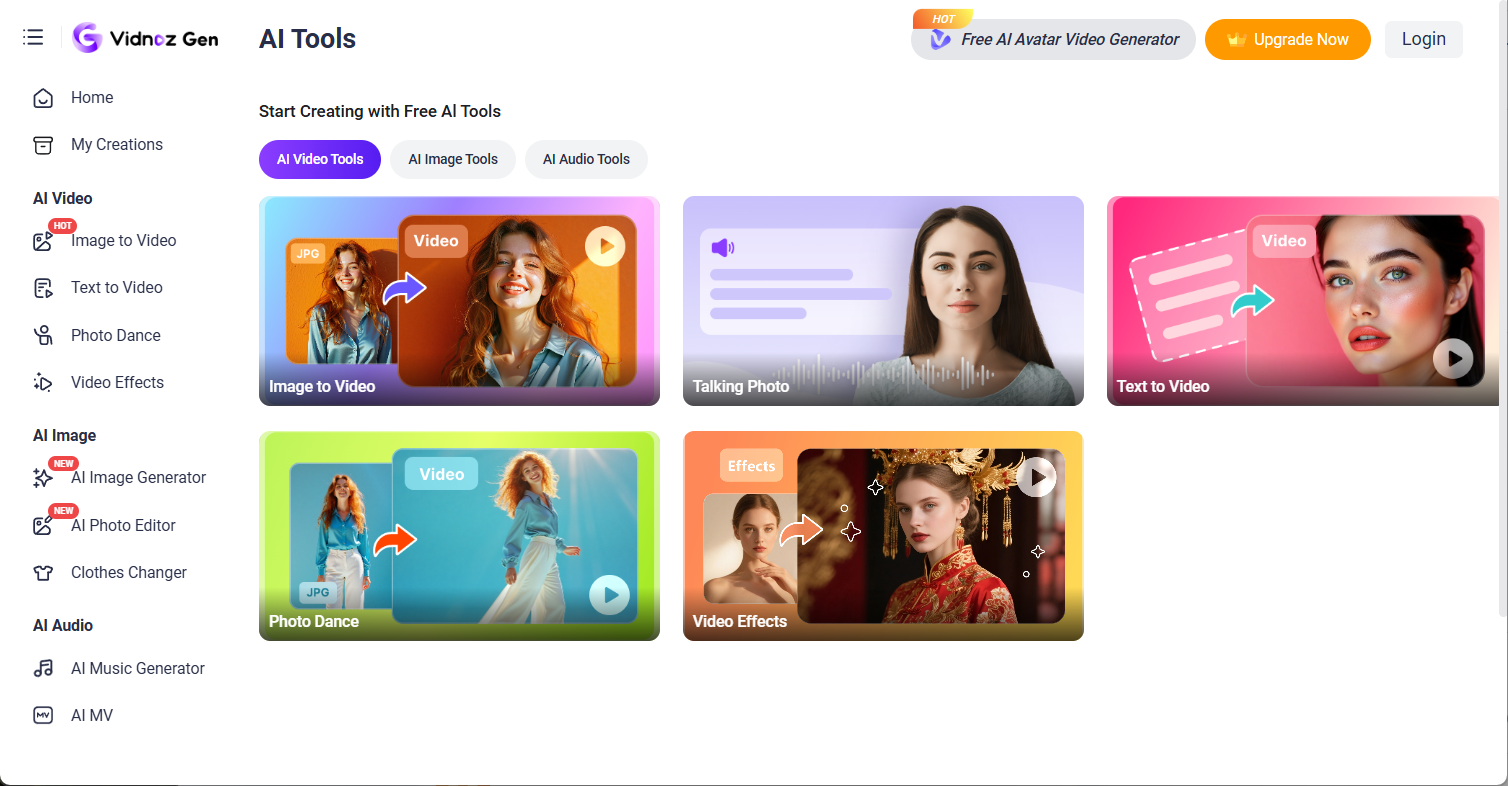
Vidnoz Face Swap lives inside the wider Vidnoz AI platform, which offers a broad range of AI video tools beyond face swapping. This makes Vidnoz a reasonable choice for users who want one account covering multiple AI video needs, with face swap as one option among many.
Vidnoz AI Video Swap Features
Vidnoz’s face swap tool supports both photo and video uploads, multi-face detection, and integration with the rest of the Vidnoz suite — meaning you can combine face-swapped footage with other Vidnoz tools like AI avatars or video editing in the same workflow.
Vidnoz Face Swap Pros & Cons
Pros: part of a larger AI video ecosystem, useful if you already need other Vidnoz tools, supports both photo and video face swap in one place.
Cons: video face swap quality can be less consistent on complex motion, the interface can feel busier since face swap is one feature among many, the free plan is capped by a daily credit limit, and free exports carry a watermark.
Is Vidnoz AI Free?
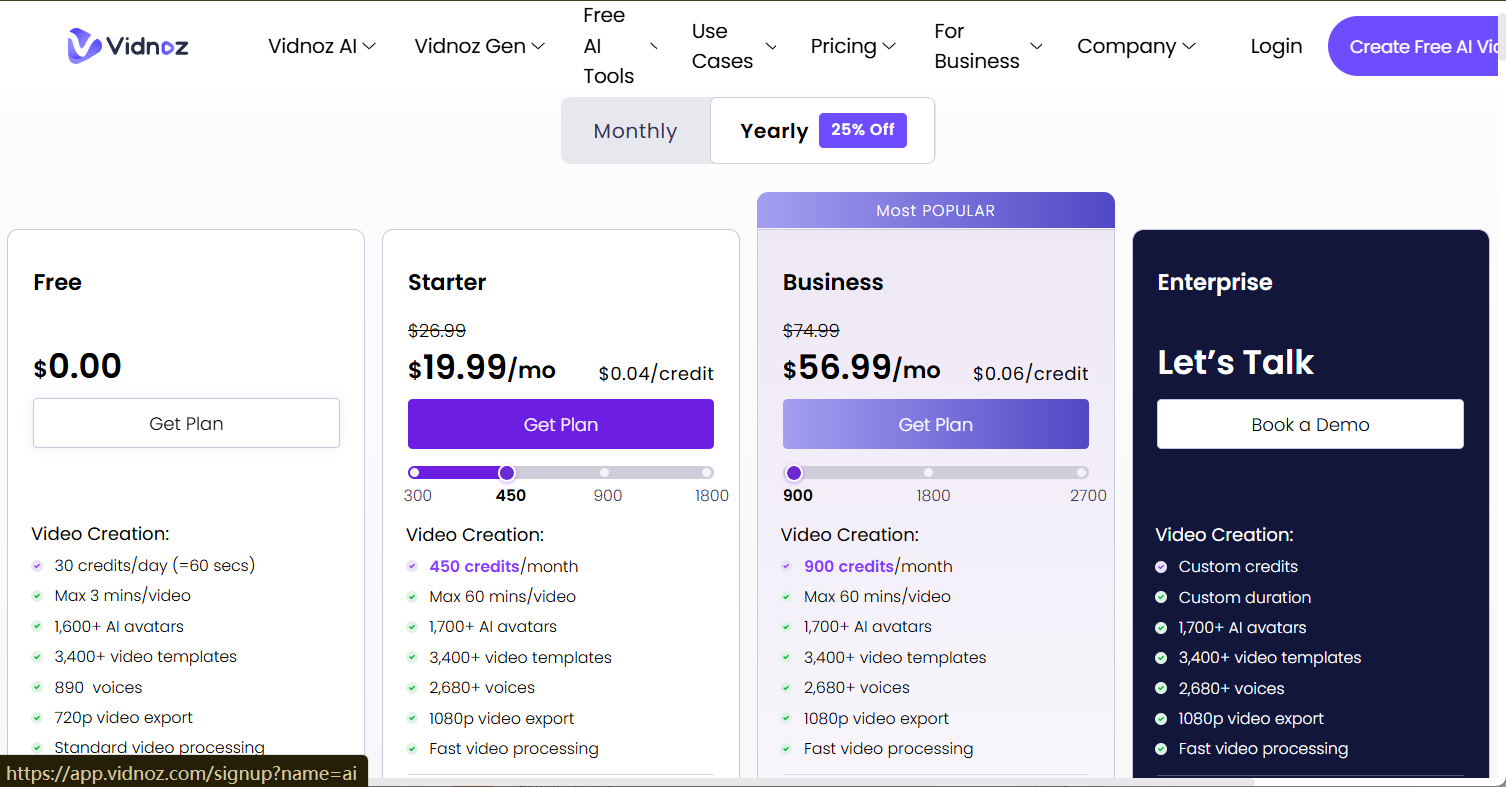
Vidnoz’s free plan gives users 30 credits per day, equal to about 60 secs video generation, and exports on the free tier include a watermark. That’s enough to test the tool, but it’s a hard daily ceiling — if you need more video length or watermark-free downloads, you’ll need to upgrade to a paid plan, which is priced around access to the wider Vidnoz platform rather than face swap alone.
Who Should Use Vidnoz Face Swap?
Vidnoz makes the most sense for users who want an all-in-one AI video platform — for example, someone already using Vidnoz for AI avatars, text-to-video, or editing who wants face swap as an added capability rather than a standalone tool.
Key Differences Between EasyFaceSwap and Vidnoz Face Swap
When EasyFaceSwap Is the Better Choice
Choose EasyFaceSwap when video face swap is your core need, when you want the fastest and simplest path from upload to export, or when you’d rather pay for exactly the feature you use instead of a broader bundle.
When Vidnoz Face Swap Makes More Sense
Stick with Vidnoz when you already rely on its other AI video tools and want face swap available in the same dashboard, or when having one platform for multiple AI video tasks outweighs having the single best tool for face swap specifically.
Is EasyFaceSwap the Best Vidnoz AI Alternative for You?
Choose EasyFaceSwap If You Need…
-
Higher, more consistent video face swap quality, especially on footage with movement or changing angles
-
A fast, no-clutter workflow with minimal steps
-
Pricing tied specifically to face swap usage, not a bundled platform
Stick With Vidnoz Face Swap If You Prefer…
-
One account for face swap plus other AI video tools (avatars, editing, text-to-video)
-
A platform you’re already familiar with and don’t want to switch tools
-
Occasional, lower-stakes face swap needs where quality differences matter less
How to Get Started With EasyFaceSwap
Getting started takes just a few steps: create a free account, upload your source video and the face you want to swap in, and let the AI process the clip. You can preview the result before exporting, and upgrade only if you need longer videos, higher resolution, or watermark-free downloads.
Vidnoz Face Swap FAQs
Is Vidnoz AI Free?
Vidnoz offers a free plan, but it’s limited to 30 credits per day (about 60 seconds of face-swapped video), and free exports include a watermark. Free-tier generation also runs at standard processing speeds and caps output resolution at around 720p, rather than the higher-resolution, faster rendering available on paid plans. Uploads are subject to standard file size limitations on the free plan as well, so very large photos or videos may need to be trimmed or compressed before processing. For unlimited daily usage, higher-resolution output, or watermark-free HD exports, you’ll need a paid plan — or you can use EasyFaceSwap, which is completely free with no daily limits, no watermark, and HD output by default.
Is Vidnoz AI Safe to Use?
Vidnoz processes uploads through its cloud servers under a standard privacy policy, similar to most AI video platforms. If privacy is a major concern, it’s worth reviewing Vidnoz’s data handling policy directly before uploading sensitive footage.
Is EasyFaceSwap a Good Vidnoz AI Alternative?
Yes, particularly for users focused specifically on video face swapping. EasyFaceSwap’s narrower focus translates into a simpler workflow and more consistent video quality compared to a feature bundled inside a larger platform.
Is EasyFaceSwap Better Than Vidnoz Face Swap for Video?
For video specifically, EasyFaceSwap tends to perform more consistently, especially with motion and lighting changes, because it’s purpose-built for this use case rather than one feature among many.
Which Tool Offers Better AI Video Face Swap Quality?
Based on our comparison, EasyFaceSwap generally delivers smoother, more natural-looking video face swaps, while Vidnoz performs well on simpler, front-facing footage but can be less consistent on more complex video.
How Does EasyFaceSwap Pricing Compare With Vidnoz?
EasyFaceSwap is currently free with unlimited use, HD output, and no watermark, and requires no account to get started. Vidnoz’s free plan is capped at 30 credits per day (about 60 seconds of video) with a watermark on exports, and unlocking higher limits or watermark-free downloads means upgrading to a paid plan tied to its broader AI video suite.
Do EasyFaceSwap and Vidnoz Support the Same Video Formats?
Not exactly. EasyFaceSwap supports MP4, MOV, WEBM, and M4V, which covers most footage from phones, cameras, and editing apps without needing to convert files first. Vidnoz supports MP4 and other common moving-image formats, but exact compatibility can vary depending on which tool within the Vidnoz platform you’re using, so it’s worth checking your specific file type against Vidnoz’s current supported formats before uploading.
Can I Use AI Face Swap Videos for Commercial Purposes?
Usage rights vary by plan and platform, so it’s important to check the specific terms of service for the plan you’re on before using face-swapped video commercially, especially for ads, client work, or public-facing content.
Are Vidnoz and EasyFaceSwap Safe for Uploading Photos and Videos?
Both platforms process uploads through cloud-based systems, and each publishes its own privacy policy covering data storage and usage. Reviewing each platform’s current privacy policy directly is the best way to confirm how your uploads are handled before you use either tool for sensitive or client content.
Conclusion: Should You Choose EasyFaceSwap or Vidnoz Face Swap?
If video face swap quality, speed, and unlimited free usage are your priorities, EasyFaceSwap is the stronger choice: it’s completely free, has no daily limits, exports in HD with no watermark, and supports MP4, MOV, WEBM, and M4V without requiring an account. If you’re already invested in the broader Vidnoz ecosystem and don’t mind the 30-credits-a-day (≈60 second) free cap and watermarked exports, Vidnoz Face Swap remains a convenient option. Either way, start with each platform’s free tier, test it on your own footage, and let the actual output quality make the final call.